
January 28, 2026
Share this page


Benefits of using a laptop with a stylus
Laptops, tablets, and 2‑in‑1 PCs with stylus support have surged in popularity—and for good reason. They deliver flexibility and precision for students, professionals, and creatives alike. Whether you’re taking notes in class, sketching concepts, or signing documents, a pen‑enabled device transforms your workflow with an experience that feels natural, intuitive, and productive.
What is a stylus and why does it matter?
A stylus is a tool you use like a pen that captures precise movements on a touchscreen, letting you write, draw, and navigate with accuracy. Modern styluses, like Microsoft’s Surface Slim Pen, mimic the feel of pen on paper with advanced features such as 4,096 pressure points, tilt support, and wireless charging – ideal for artists, designers, and multitaskers.
Key benefits of using a laptop or tablet with a pen (stylus)
Using a stylus changes how you interact with a laptop or tablet by adding capabilities that go beyond standard touch or keyboard input, for example:
- Precision control: For detailed tasks like drawing, design work, video editing, and handwriting, a stylus offers pinpoint accuracy that touchscreens alone can’t match.
- Natural notetaking: Students and professionals can appreciate the familiar pen‑on‑paper experience, in digital form.
- Creative freedom: Artists and designers gain expressive tools—pressure sensitivity and tilt enable shading, sketching, and illustration with confidence.
- Improved productivity: Quick annotations, digital signatures, and multitasking become faster and more intuitive.
- Accessibility: Stylus input provides a comfortable, precise alternative for those who find touch or trackpads challenging.
Types of devices to consider
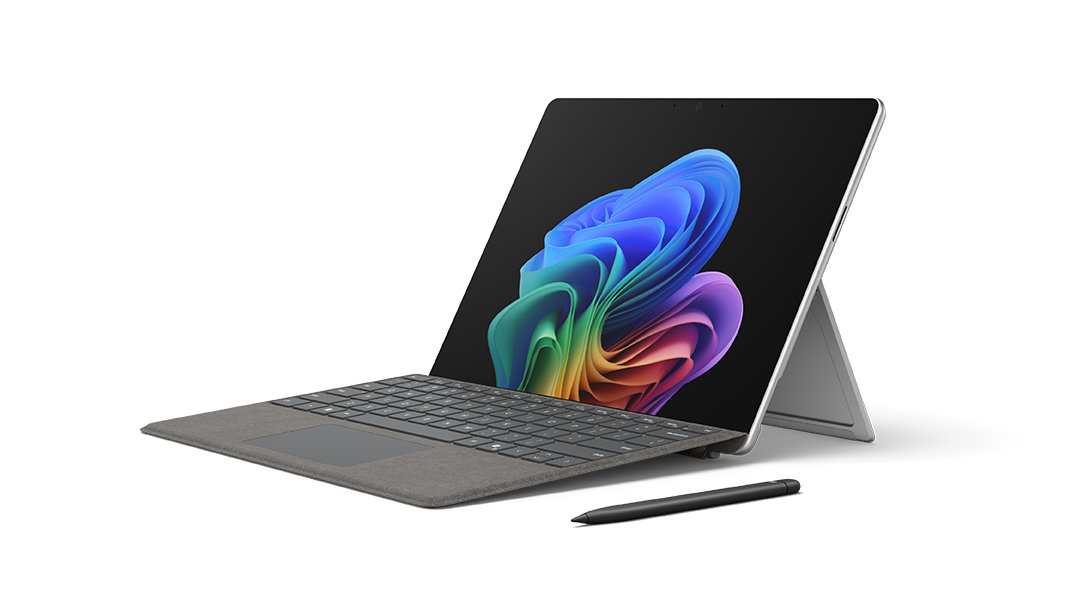
To unlock the full potential of a stylus, pick a device engineered for natural pen interaction and optimized for precision. Surface Pro 2-in-1 Copilot+ PCs stand out with seamless integration with Surface Slim Pen, delivering natural pen-on-paper feel and advanced features like pressure sensitivity and tilt support.
Take a look at the device types that let you take full advantage of pen capabilities.
2-in-1 laptops
- Pros: Flexible formats that switch between laptop and tablet modes, making pen input easy in both work and creative settings.
- Best for: Users who want versatility—typing when they need it, tablet mode when they want a more natural handwriting or drawing experience. For example, Surface Pro 2-in-1s work like a laptop and play like a tablet, ready to create with touch, voice, and pen.
Touchscreen laptops with pen support
- Pros: Full PC functionality with the added precision of pen input, strong performance, and excellent portability.
- Best for: Professionals and students who need a reliable all-in-one device for productivity, meetings, notes, and creative work.
Drawing tablets with pen
- Pros: High-precision pen performance, often with advanced pressure and tilt capabilities.
- Best for: Designers and illustrators who need dedicated hardware for digital art and detailed creative workflows.
Standalone tablets with Pen
- Pros: Lightweight and portable, great for quick sketching, note-taking, and on-the-go use.
- Best for: Note-takers, casual creatives, and users who prioritize mobility over full laptop power.
Features to look for
When choosing a laptop or tablet with stylus support, the right features can transform writing, drawing, and productivity. Key features to consider:
- Pressure sensitivity & tilt: Control line thickness and shading for realistic writing and drawing.
- Battery life & charging: Magnetic attachment and wireless charging for uninterrupted workflow.
- Screen size & resolution: High‑resolution displays improve accuracy for sketching and editing.
- Software compatibility: Integration with apps for creativity and productivity.

AI art created via Copilot
Surface Laptop and Surface Pro – with Surface Pen
Surface laptops are designed to deliver a seamless blend of performance, portability, and versatility. Surface Laptop1 offers a sleek, touch-optimized experience ideal for everyday productivity, while Surface Pro 2-in-1 design gives you the best of a laptop and a tablet, all in one device. best of a laptop and a tablet, all in one device.
Here’s why Surface Pro paired with Surface Slim Pen stand out:
- Natural pen-on-paper feel: 4,096 pressure points and tilt support for expressive shading and precision.
- AI-powered productivity: Handwriting-to-text conversion, intelligent note summarization, and sketch-to-image generation.
- Seamless portability: Slim design, up to 15 hours of battery life2, magnetic pen attachment, and wireless charging3.
- Complete workflow integration: Works flawlessly with Microsoft 3654 apps for note‑taking, design, and collaboration.
How to choose the right device
Selecting the right device depends on your workflow, budget, and balance between portability and performance. A stylus-enabled device can maximize productivity, creativity, and convenience. Here’s what to consider:
Budget
Start by defining your budget. Balance premium features with cost—accessories like keyboards and pens add value.
For example, bundle a Surface Slim Pen with a Surface Pro keyboard to transform a Surface Pro and enjoy exceptional accuracy, shading, and pressure sensitivity.
Primary use
- Art and design: Look for high-precision stylus support, pressure sensitivity, and tilt functionality—Surface Pro with Surface Slim Pen excels here.
- Notetaking and study: A lightweight, portable device with handwriting-to-text conversion and seamless integration with apps like OneNote is ideal.
- Productivity: Industry leading AI features4, multitasking, and compatibility with Microsoft 365 apps5 make Surface Pro a strong choice.
Portability vs. power
Consider how often you’ll carry your device versus the performance you need. A 2-in-1, like Surface Pro, offers tablet mobility without sacrificing PC-level power.
Experience precision, creativity, and productivity
A laptop or tablet with stylus support can revolutionize your workflow. For the ultimate experience, pair Surface Pro with a Surface Slim Pen—a complete, versatile solution with AI-powered features for sketching, note‑taking, and real-time collaboration.
- DISCLAIMER: Features and functionality subject to change. Articles are written specifically for the United States market; features, functionality, and availability may vary by region.
- [1] Optimized for touch interaction only. Pen input and compatibility with Surface Pen, Surface Slim Pen, or similar accessories is not supported.
- [2] Battery life varies significantly based on usage, network and feature configuration, signal strength, settings and other factors. See Surface Battery Performance for details.
- [3] Surface Slim Pen (2nd Edition) can charge with Surface Pro, Copilot+ PC, 12-inch, Surface Slim Pen Charger, Surface Pro 13-inch Flex Keyboard, Surface Pro 13-inch Keyboard with pen storage, and Surface Laptop Studio. All are sold separately. Visit Surface Slim Pen Compatibility to learn more.
- [4] Copilot+ PC experiences vary by device and market and may require updates continuing to roll out through 2025; Recall and Click to Do will be coming to European Economic Area later in 2025. See aka.ms/copilotpluspcs.
- [5] Microsoft 365 Personal or Family subscription required; AI features only available to subscription owner and cannot be shared; usage limits apply. Learn more.
Mentioned in this article

Compare Surface Copilot+ PCs
You may also like

The differences between Surface Laptop and Surface Pro from Microsoft

Why a Microsoft Surface is the best Copilot+ PC experience
